Share

Widgets

Showing posts with label Asus. Show all posts

Friday, December 9, 2011

Asus eee pc slider review


Asus eee pc slider

Wewere totally taken by the Eee Pad Transformer when it came out because it didsomething different to the iPad, and so gave itself room to breathe away fromthe tablet big guns.

Nowits brother, the Asus Eee Pad Slider has arrived, and manages to stand out inmuch the same way.

Thespecs are fairly typical for tablets these days. The Eee Pad Slider features a1GHz Nvidia Tegra 2 system-on-a-chip, offering dual-core power and goodgraphics performance, which powers Android 3.1 out of the box (though you canupgrade to 3.2 as soon as you get it connected to the internet, and an Android4.0 update is on its way).

There's1GB of RAM to keep multitasking smooth, along with 16GB or 32GB of internalstorage, though a microSD card slot means you can boost this. Wi-Fi is presentup to 802.11n, as is Bluetooth.

Thescreen is a generous 10.1-inch 1280 x 800 IPS affair, so there's plenty ofspace for Android 3.2 to show us what it's got. We'll go into full detailsabout the screen's quality on the Performance page.
Theobvious major feature draw for the Eee Pad Slider is its slide-out keyboard.Offering a wide range of keys, it's got options for Home, Back and Menu, aswell as a few keys to help you quickly conserve power if you're concerned aboutyour battery life. Specifically, you can turn Bluetooth on and off, turn Wi-Fion and off, and adjust the brightness.
 
Asushas taken the same route as other manufacturers when it comes to customisingAndroid on tablets, and has included a carefully picked selection of apps andan original widget to make the Slider stand out.


TheAsus Launcher is a slick widget that displays various bits of information,including the last website you left open, the currently playing music, calendarappontments, the weather, the date, and a slideshow of your photos.


It'sa lot of stuff to cram into a widget, but it works really well thanks to asimple, no-nonsense design. We certainly prefer it to the utilitarian launcherwidget included on the Lenovo IdeaPad K1.

Asfar as the apps go, the most useful is surely Polaris Office, given the natureof this tablet. It's a really good inclusion, with a slick, surprisinglypowerful interface and options to create text documents, spreadsheets andpresentations.
 

Theword processor is particularly impressive, with tools for indenting, reflowingtext, including media, tweaking fonts and loads more. In fact, we used it andthe Slider's keyboard to write this entire review, with no problems in general(though a regular auto-save function would be gratefully received).

Cleverly,Asus is including an impressive cloud deal with the Slider. Asus' WebStorageoffers unlimited online storage free for a year with the Slider. The app for itis easy to use, though it's a shame that you're unlikely to see it integratedinto apps in the way Dropbox often is.


Amazon'sKindle client is included for readers, as is Zinio for buying and readingmagazines, along with Press Reader for getting the newspapers right on yourdevice. They're a killer trio of apps, all offering a great array of content,even if Zinio and Press Reader don't give you the flexibility in thepublications that you get from Apple's Newsstand on the iPad.

Asushas also beefed up the built-in media options with MyNet, which adds mediastreaming both to and from the Slider.

TheUSB port on the side adds a few handy features, too. The first is that, likethe Asus Eee Pad Transformer, you can plug in a USB mouse and control thetablet that way. If youre doing a lot of word processing/spreadsheet work, youmight find this quite useful.

Italso works a USB host for mass storage, so you can plug in USB drives or memorycards (with an adapter) and use the included File Manager app to browse andmove files.

Ontop of all this are the usual Google apps, including the Android Market.Nvidia's Tegra Zone is also bundled, making it easy to find games, if you want.No games are included, which is unsurprising considering how this tablet feelsmore work-focussed.

Ofcourse, behind the screen is where things get interesting. By grabbing the topof it, you can pull it up, so it slides back and sits up at an angle to revealthe built-in keyboard.


Thefront of the device is glossy black with a silver rim, like a lot of tablets,including the Samsung Galaxy Tab 10.1, but the keyboard and rear case of the EeePad Slider are a kind of chocolate colour, with a matt finish.

It'san unusual direction for tablets, but one that we think works for this one. Themore we used the Eee Pad Slider, the more we found it to be an office-focussedtablet, and the aesthetic really fits that. Overall, it bears far more of aresemblance to a BlackBerry Boldhandset than the iPhone, and we doubt thatscoincidence.


Thebuild quality of the two halves of the Eee Pad Slider is excellent, feelingtotally solid and without any noticeable give. Our only (admittedly very mild)concerns are with the joins between the two.

Wedon't expect the hinge to break on anyone for no good reason, but the way thescreen just sits loose and wobbly when in the upright position is odd comparedhow solid the rest of the device is.

There'salso a ribbon connecting the screen to the keyboard. While we've no doubt thatthis offers a huge power consumption advantage over using Bluetooth to connectthe two, it's an obvious weak point if your Slider should take an unexpectedtrip to the ground.

Aroundthe sides, you've not only got your microSD card slot, but also the Lock key, avolume rocker, a reset button that's far too easy to press, a mini-HDMI portfor video output, Asus's proprietary connection for USB connectivity andcharging, a 3.5mm headphone jack, and a full-size USB port.


Havingtwo separate sliding halves in this tablet inevitably means it's a lot thickerthan the competition. At 273 x 180.3 x 17.3mm, it's around twice as thick as aniPad 2, and at 960g it's around 50 percent heavier.

Theweight difference really does tip it from being comfortable to hold to beingjust too heavy to keep in one hand for long. Between this and the slide-outfunction, which puts the screen at a great angle for both desk and lap use, itbecomes clear that the Eee Pad Slider is less of a competitor for tablets likethe iPad, and is more targeting replacing netbooks and smaller laptops.
 
TheEee Pad Slider looks set to be available for around £450 in its 32GB version,which isn't as cheap as the keyboardless half of the Eee Pad Transformer, butis good value compared to most other Android tablets.

TheAsus Eee Pad Slider earns itself a huge tick in the performance column in onevery simply way: this is the smoothest Android tablet we've seen yet.


Scrollingbetween Home screens is as slick as you like, the app list flashes up and awayin an instant, apps load quickly, the multitasking list is smooth and stable –this is Android at its very best, for general use, without a doubt.

Itstill suffers from Android's common imperfections, though. When zooming orpanning in the browser, it's fast and responsive, but there can be a stutter,which makes it difficult to be precise. Sometimes, particlarly in the browser,there will be a mysterious lag when typing in the URL bar, which isfrustrating.

Thebrowser is fast to load sites, certainly, but consistently lagged just behindan iPad 2 running iOS 5 in head-to-head tests (both with Flash turned on andoff). Android 4.0 looks set to boost Android tablets in this area, but that'sthe situation as it stands.

Andyes, Flash 11 is available as ever from the Android Market. And yes, browsing apage with Flash content will drastically reduce the responsiveness of thebrowser. In addition, many iPlayer videos had an odd black mark that appearedoccasionally, while going between fullscreen and a smaller window within thebrowser often caused the audio to go slightly out of sync.

However,the videos did play, and play smoothly, so for those of us who can't livewithout Flash, performance is about as good as we can get at the moment.

Mediastored on the device played impeccably. HD video in particular was absolutelybrilliant, with both 1080p and 720p files playing back smoothly. The killer isthe crisp, clear screen, though. It's absolutely perfect for video, and the waythe screen sits up on the Slider when the screen is out makes this an idealtablet to keep you entertained on a long journey (well, save for the batterylife, as we'll explain in a moment).

Thatscreen really is the best thing about the Eee Pad Slider. At 1280 x 800, it'snice and high resolution, with text appearing crisp and easy to read. More thanthat, though, colours are vibrant and hugely appealing, and the viewing anglesare excellent. It's also brighter than a lot of Android tablets. It's one ofthe best tablet screens we've seen, to put it simply.

Ofcourse, the keyboard is a big feature for the Eee Pad Slider, since it's prettymuch its reason for existing. And the good news is that is isn't bad. The keysare fairly small, but a nice gap between them makes them easy to find withoutconcentrating.

Infact, we found it easy to hit the right key first time over 90 per cent of thekeyboard, despite its size. You will inevitably miss more keys than you wouldon a full-size keyboard, but no more so than other small, portable keyboards.

Mostof the 10 per cent where we weren't hitting the right keys was hunting forthings like Control and Alt, which are slightly displaced because of the Home,Back and Menu keys.

Theonly really annoying aspect was that it's ludicrously easy to hit the up arrowbutton instead of the right Shift key. We did it constantly throughout thisreview, and it gets more annoying every time.

Youwill, of course, come to accomodate the layout as you get used to it, but evenafter hours of use, we were still nudging that damn up arrow.

Still,though, we give the keyboard a thumbs up, and the angle of the screen makes thewhile thing reasonably comfortable to use. Any small mobile keyboard has layoutfoibles, so we don't begrudge them too much, even if they can be annoying.

Thelast big thing for tablets is battery life, and this is probably the Slider'sweakest area. It's rated for eight hours, but when we tried streaming videoover Wi-Fi with the screen's brightness turned all the way up, we got justunder five hours out of it.

Thisisn't terrible, though. You can expect a good deal more battery life than thatif you're just using it type documents, for example. Though it's certainly wellbehind what the iPad can give you, let's remember that this is more focussed onthe netbook/small laptop market than the iPad, and compared to most laptopsthis is great battery life in a far lighter package.

Andas is so often the fashion, the Eee Pad Slider features front and rear cameras.The 1.2-megapixel front camera is as good as it needs to be, picking up adecent amount of light. The angle of the screen when slid out will give theperson you're chatting to a lovely view of your nostrils, but it works wellenough.


Therear five-megapixel camera turned out to be surprisingly good on a sunny day,though the 720p video footage it takes was rather weak, with a huge amount ofartefacting ruining any semblance of detail.

Verdict
OurScore 4.5

Itbecame clear to us when using the Eee Pad Slider that Asus isn't going afterquite the same market as the iPad or Samsung Galaxy Tab 10.1. It's too heavyand too thick to be in quite the same bracket, because of its keyboard.

Butas an alternative to a small laptop, it really comes into its own. Suddenly itseems small, and light. Fast, too, compared many lower-powered Windows 7machines. It even comes with a great office suite ready to go. This is a tabletfor the office, the desk at home, or the briefcase, and it really works.

We liked:

Thescreen is absolutely brilliant, which is always the first thing you want to seea tablet get right.

Thesame goes for the touch control and overall performance. Though smoothness inthe browser and some other areas isn't quite as perfect as the iPad, this is amore than capable machine.

Theway the keyboard slides out puts the screen at an ideal angle for on a desk oryour lap – something that's clearly been thought through. And the keyboarditself is pretty good for a small mobile offering; good enough to write thisreview on.


Theincluded apps are very useful, but quite understated, too. It's not bloatware –this is a great suite to have available from the off.

We disliked:

Theonly real disappointment with the Eee Pad Slider is the battery life. It's wellbelow the likes of the iPad, and we'd hoped for better. As we said before,though, it holds its own against the kind of laptops it's most likely toreplace, so it's not a deal breaker.

Similarly,it's chunkier and heavier than other leading tablets, which is a shame, butinevitable when you consider the extra mechanics and casing required for itstwo halves. And again, it compares favourably to laptops.

Ourother gripes are only very minor foibles, really.

Thekeyboard is still harder to use than a full-size one, even if it's very goodoverall. Some people may never find it comfortable, but this is true of allsmall keyboards.

Androidstill needs some spit and polish here and there – hopefully Android 4.0 willbring at least some of that, and we're really looking forward to seeing theSlider with future versions of Android on.


As atablet, this is a slightly flawed gem with a gimmick that not only makes itstand out, but makes it genuinely useful.

Butas a laptop replacement, this is nippy, light, versatle and hugely desirable.As tablets increasingly become work tools, we fully expect the Eee Pad Sliderto be right at the forefront of the revolution, thanks to its smoothperformance, stunning screen, handy software and more-than-adequate keyboard.

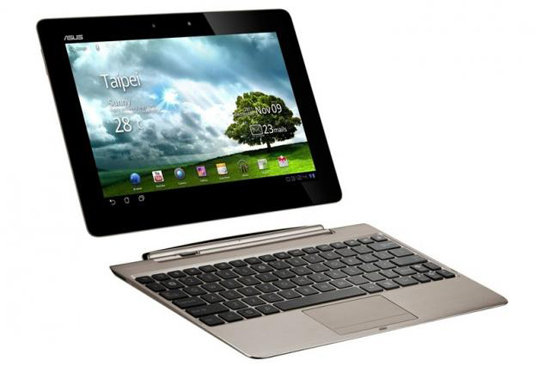
Asus Eee Pad Transformer Prime review


Asus Eee Pad Transformer Prime review

Theburning question with the Asus Eee Pad Transformer prime release, as with anytablet, is this: is it better than the Apple iPad 2?

Theimmediate follow-up question is usually a bit less thrilling: can it beat thereigning champion of Android tablets, the super-slim and light Samsung GalaxyTab 10.1?

We'llexplore both questions in depth, but for those whole don't like to wait aroundfor the punch line, we'll say that the super-thin and light Asus Eee PadTransformer Prime might just be the best tablet ever made.

Butfirst, the basics - in the UK, the Asus Eee Pad Transformer Prime will go onsale in January 2012. There's only going to be one version over here, which isa 32GB SKU bundled with the keyboard,a charger, cleaning cloth, USB cable andearbuds.

Thisbundle will cost you £499, which is £70 more than the 16GB tablet-keyboardbundle that the original Eee Pad Transformer came in when it launched earlierin 2011.

Themost important spec on the new Transformer is the Nvidia Tegra 3 processor.Everything amazing about the Prime tablet rests on this quad-core, 1.3GHz chip.

HDvideos play smoother (and longer, with up to 12 hours of battery use for video)than ever before. Games suddenly look fluid and dynamic, with water rippleeffects, smoke, fog and explosions that mimic what you'd normally find in a PCgame.


Asus eee pad transformer prime review

Thesuper-crisp IPS display, which is similar to the one used on the iPad 2, isrefreshingly easy on the eyes even in outdoor locations or with incandescentbulbs blazing around you.

Therear 8MP camera is a wonder of engineering. In several tests, HD videosrecorded at 1080p looked smooth and clear, unlike the grainier results from theSamsung Galaxy Tab 10.1. Even the 1.2MP front-facing camera worked well forvideo chats, without the typical fuzziness of other tablets.

TheAsus Eee Pad Transformer Prime also includes a free intuitive Asus webstorageapp for offloading your files, and you can pop in a microSD card in a left-sideslot up to 32GB each.

Allof the typical connection options are here: Wi-Fi 802.11n, Bluetooth 2.1, a3.5mm headphone jack on the right and a micro HDMI port (also on the left) forconnecting to an HD TV.

The263 x 180.8 x 8.3mm tablet is wider than the Samsung Galaxy Tab 10.1, althoughthe screen, at 1280 x 800p resolution and 10.1 inches, is the same size.


At586g, the Asus Eee Pad Transformer Prime is lighter than the iPad 2 but a touchheavier than the Samsung Galaxy Tab 10.1, although nobody will notice a fewgrams.

It'salso the thinnest tablet on the market today, bar none.

The25Wh lithium-polymer battery lasts for about nine hours on a charge for normaluse. Asus claims a battery life of 12 hours if you watch mostly videos, becauseof the way the Tegra 3 manages power.

Thetablet comes running Android 3.2 Honeycomb, but Asus says it's compatible withAndroid 4.0 Ice Cream Sandwich, if you wish to upgrade when the update becomesavailable next year.

Features

Wesaid up front that we will answer questions about whether the Asus Eee PadTransformer Prime beats the Apple iPad 2 and the leading Android tablet, theSamsung Galaxy Tab 10.1. Truth be told, some of the factors that will help youdecide between the three similar tablets are subtle, yet important.

Let'sstart with the hardware design. All three tablets look remarkably similar. Anuntrained eye wouldn't know the difference between them.

Turnthe Asus Eee Pad Transformer Prime over on its back, and there's a silver backcover that looks much more durable than the white plastic back of the SamsungGalaxy Tab 10.1 and grey back of the iPad 2. The front IPS screen, made withGorilla Glass, is also durable and sharp.

There'sa proprietary charge port below the main horizontal screen on the Asus Eee PadTransformer Prime. This is the same port you use to pop the device into thelaptop dock.

Thereare two extra ports that secure the tablet to the dock, and when housed thatway, the Asus Eee Pad Transformer Prime works reliably as a touchscreen laptop.

Thedock isn't ideal for long typing sessions, and matches the quality of otherlapdocks such as the one for the Motorola Atrix 2. In other words, they arefunctional and provide a mouse pad, quick access function keys, a USB port andan SD memory card slot. But otherwise it doesn't match the responsive typing ofa regular full notebook computer.

Someof the port covers on the Asus Eee Pad Transformer Prime's dock are a bit hardto remove. For example, the one that covers the USB port might require someprying loose with a knife.
Overall,the Asus Eee Pad Transformer Prime is easy to handle. It's wider than theSamsung Galaxy Tab 10.1, so is easier to grip, with a slightly wider bezel. Butit seems a bit less portable for that reason as well.

Theback is metallic and durable, but not exactly scratch or smudge-resistant, aswe found out. The Samsung Galaxy Tab 10.1 has a bit more of a pick-up and gofeel to it only because the Asus is wider and felt just a hair wider andlonger.

Interface

Asuspacked some choice extras onto the Eee Pad Transformer Prime, but generallystuck to the basic Android 3.2 Honeycomb user interface. In fact, there arejust a few extra widgets for quickly reading your emails, seeing the weatherforecast and controlling music tracks.

There'sa goofy app called MyZine that automatically adds your photos into amagazine-like layout, but it has a limited purpose and might be the first oneyou drag to the trash.


Thereare no extra app widgets like there are on the Lenovo ThinkPad Tablet foradding favorites to an app wheel or an app launcher. Frankly, these additionsoffer a nebulous value beyond the stock operating system.

Asusused a slightly modified treatment for the bottom row of icons. There's a backbutton, a home button and a pop-up multitasking button that shows you open appsand enables you to switch between them. Here you can also click a small X thatshuts down any open app to save memory.

There'snot too much more to say about the Asus Eee Pad Transformer Prime's interface,because Asus kept things simple. There are no extra tools for storing apps likethere is on the Toshiba AT100 (known as the Toshiba Thrive in the US), but someof those enhancements don't really add to the value anyway. The simple coreAndroid OS makes the Prime easy to use.
Android Market and Apps

TheAndroid Market included on the Asus Eee Pad Transformer Prime has been upgradedwith a new interface that is surpassingly easy to use. Following the lead ofthe well-designed HP TouchPad app store, there are panels with rich photos thatdraw your eye and make you want to purchase more apps. The new look also mimicsthe Windows Phone 7 look, in that it is image-centric to draw the eye.


Ofcourse, once you drill into the Market a bit you will realise that this glossymagazine-like front-end interface is just icing on the old cake - the Marketworks about the same as always. You can rent movies and television showsthrough the Market as you can on other recent tablets.

WhereAsus scores extra points is with the included apps. It has quite outdone itselffor this model.

First,there's a MyLibrary app for ebooks, magazines and newspapers. Then not quite asextensive as the Amazon Kindle Store (OK, far less extensive), the Asus @Vibestore, which is really just a portal to Versent Books, lets you buy majorbestsellers such as John Grisham's The Litigators.
Pricingis suspiciously the same as most Amazon Kindle store bestsellers. Some bookswere noticeably missing, including the latest Michael Lewis book calledBoomerang, which is featured prominently in the Kindle store.

Asus@Vibe Music is a welcome addition. With functionally similar to the GoogleMusic app, this music app works like Last.fm in that you can search for anartist and play their songs.

Each"station" lets you play random songs by that artist. The @Vibe storealso lets you play songs you have purchased from the Asusvibe.com store, aslong as you have used a supported Asus laptop or netbook.

AsusMyCloud is a handy cloud storage portal similar to Dropbox. You can use 2GB ofstorage for free, or pay about US$9 for three months of unlimited storage. Keepin mind, though, that the service limits file size to 500MB per file for thefree account.

Also,while the app lets you offload files to the cloud, you can also access files onone computer that is sharing files through the service.
TheAsus MyNet app works exactly like the Samsung Allshare service, in that you canset up a connection to and from another computer on the same router network toshare music, photos and videos. We tested the app with a Sony all-in-onedesktop PC and could easily share files between the tablet and the desktopcomputer.

TheAsus Eee Pad Transformer Prime we tested also came pre-loaded with a wideselection of pre-release Tegra 3 games, including BladeSlinger, ShadowGun andDavinci THD. These titles will be available through an app portal called theTegraZone, and generally cost about the same as normal Android games.

Oneimportant point to make about gaming on the Asus Eee Pad Transformer Prime isthat the games look astounding - the best we have seen on any tablet. ShadowGunin particular uses water effects that look ultra-realistic for a portabledevice (although nothing like, say, Battlefield 3 on a console).

Themost interesting comparison we discovered was between the Samsung Galaxy Tab10.1 and the Asus Eee Pad Transformer Prime playing the same game, Riptide. Onthe Prime, the water effects were much more convincing, with waves flowing backand forth and whitecaps that change as you drive your jet ski.
Atthe same time, the Apple iPad 2 may not play games as smoothly, but there is amuch wider selection of games, and many are arguably more in-depth. Forexample, the gameplay for Infinity Blade II on the iPad 2 is far more advanced,with magic ring power-ups, duel-wielding options and collectible gems.

Manyof the games on the Asus Eee Pad Transformer Prime are more like visual effectsdemos, with limited gameplay value.


Office

TheTransformer Prime also includes the Polaris Office app for opening and editingword processing and spreadsheet documents. It's completely compatible withMicrosoft Office.
Theapp does add value, especially since competing office apps like Openoffice cost£9.99 or more.

Screen

The1280 x 800 resolution, 10.1-inch screen on the Asus Eee Pad Transformer Primeis sharp and easy to read.

Wehad no complaints reading an entire ebook on the Asus Eee Pad Transformer Primeand browsing dozens of websites. Finger swipes and presses registeredaccurately, and typing was fast and responsive.

Asuschose to use a Super IPS display for the Asus Eee Pad Transformer Prime, andthere are pros and cons with this.
TheAsus Eee Pad Transformer Prime is not as bright, colourful, or crisp as theSamsung Galaxy Tab 10.1, so if you plan to watch movies and view photosroutinely, the Samsung is the better tablet.

Incomparing the exact same videos and photos on both devices, the Asus Eee PadTransformer Prime has a slightly dull and washed out look. The Apple iPad 2looks marginally better than the Prime (they both use IPS displays) but not asvivid as the Samsung Galaxy Tab 10.1.

Clearly,Asus decided to make functionality a higher priority than superior colourreproduction.

TheAsus Eee Pad Transformer Prime works better than the Samsung Galaxy Tab 10.1 ina variety of lighting conditions. There's even a super-bright outdoor mode thatmakes the display easier to read.

Thereis much less glare on the Asus Eee Pad Transformer Prime than the SamsungGalaxy Tab 10.1, which means the screen works better, for reading emails and booksand for browsing the web.


Unlikesome recent tablets, the Asus Eee Pad Transformer Prime doesn't use hapticfeedback for the keyboard or for any parts of the touchscreen. Presumably thisis a trade-off with the IPS screen tech that makes it easier to view the tabletfrom an angle or to view the screen in bright sunlight or by a lamp.

Itdidn't hamper the experience of using the tablet, though some users might findthat haptic feedback on other tablets gives you a tactile sense that the tablethas registered your finger press.

Onesurprise is that the screen uses an oleophobic fingerprint-resistant coating.Even more surprising is that it actually works. The chemical agent reducedgrime and finger print build-up. We found that movie-watching was moreenjoyable when there wasn't a thin residue coating parts of the screen.
Usability
Thethinnest Android tablet on the market, but can it beat the iPad 2?

OurScore 4.5
TheAsus Eee Pad Transformer Prime is one of the most user-friendly tablets we'vetested, and matches up easily with the Samsung Galaxy Tab 10.1 and Apple iPad 2in terms of portability, user interface and media playback.

Betweenthe three tablets, the only major difference is that the Asus Eee PadTransformer Prime is just a little wider and longer, even though the screensare all the same size. That's not a negative pronouncement, and in fact meansthe Asus Eee Pad Transformer Prime is a bit easier to grasp for long webbrowsing sessions or for watching movies.

Theoriginal Asus Eee Pad Transformer felt bulky, overly thick and designed from abygone age of Windows slates.

Asusskipped any dramatic interface enhancements and sticks to the basic Android3.2.1 Honeycomb user interface. That means three buttons for navigating back,home, and to a pop-up app list on the lower left.

Thenewly designed pop-up menu on the lower left (which shows a taskbar for time,app downloads and open apps) is a pleasant departure, though. You can quicklysee the Wi-Fi network you are using, your battery level and access settings.

Thereare three icons you can use to set the power level - eco mode, balanced andperformance. You can also enable screen rotation, check Wi-Fi level and enableBluetooth connections. There's an option for setting the brightness level, orusing auto, and enabling the outdoor brightness.

Otherwise,this pop-up then shows notifications about recent downloads, schedule remindersand email alerts. You can also view Gmail chat messages here. In general, thenew design for this pop-up works remarkably well for controlling basicfunctions on the Asus Eee Pad Transformer Prime. The pop-up is well-designed aswell.

Onegripe, though, has to do with accessories. Sure, there is a lapdock included asa bundle for the UK version. However, the Apple iPad 2 offers many more choicesfor docking stations, covers, cases and even microphones you plug into the30-pin connector.

Theoriginal Asus Eee Pad Transformer didn't become iconic in the sense thathardware accessory companies started making add-on devices for it. The Asus EeePad Transformer Prime may catch on, but we doubt it will develop the widespreadthird-party support that the iPad 2 enjoys, or even come close.

Thekeyboard dock is helpful for a few purposes, though. For one, it adds another 8hours to the total battery life (the dock itself can take a charge, and thencharge the tablet.) The dock has a USB port and an SD port. Measuring 263 x180.8 x 8 to 10.4mm, and weighing 537 grams, the dock is small enough to fitinto a laptop bag, but is like carrying another tablet around all day.

Andthen there is the quality of the keyboard. If you've used a netbook before, youalready know what this dock is like – typing speed suffers from the slightlycramped confines of the lapdock, but you get used to it after a while and it'sstill easier than typing on the screen.

Thereare dedicated keys for changing brightness level, volume, and wireless, whichmakes it easier to control the tablet. When docked, you can use the mousepad orfinger input on the tab. One helpful software change would have been to disablethe mousepad when you type because the small size of the keyboard makes it easyto inadvertently brush the mousepad. In a pinch, the keyboard helps you type uplonger docs but it in no way competes with a full notebook keyboard.

Battery life

Forbattery life, the Asus Eee Pad Transformer Prime lasted about nine hours on acharge but of course with the extra 8 hours provided by the keyboard dock,that's a battery span of 17 hours which is phenomenal.
Media
Thethinnest Android tablet on the market, but can it beat the iPad 2?


Ourfirst experience with media files was a bit of a letdown. We download the movieConanthrough the Android Market and were greeted by an error message. Asus saidit must be a Google problem, but the same file and same Android version on theSamsung Galaxy Tab 10.1 worked fine.
Otherwise,all of our media tests were blazingly fast, smooth and played without anyproblems. One of the most impressive tests was for the Battleship trailer,which used a high frame rate, looked colourful and clear, and played in full1080p resolution. Every video we tested played smooth and fast.

Musicplayback on the Asus Eee Pad Transformer Prime also worked reliably and soundquality was excellent.

Likemost tablets, the speaker on the Prime isn't exactly state-of-the-art quality,and is only serviceable in a pinch when you absolutely can't use headphones.Yes that is just the one speaker, instead of the two speakers we saw on theside of the Samsung Galaxy Tab 10.1.

Thatsaid, the Asus Eee Pad Transformer Prime is just a bit louder than both theSamsung Galaxy Tab 10.1 and the Apple iPad 2 when we cranked up the volume,even if the sound quality wasn't that great and sounded a bit distorted attimes.

Notablet on the market has really exceptional sound, though, and the Asus Eee PadTransformer Prime is in the same league.

Wetested both H.264 movie files and those encoded as MPEG as they workedsmoothly. This tablet does not support Quicktime, but the Tegra 3 does supportH.264 1080p30/60i (HP @ 40Mbps), VC1-AP 1080p30, MPEG2 1080p30/60i, MPEG41080p/30, DivX 4/5/6 1080p30, XviD HT 1080p30, H.263 4CIF/30, Theora, and VP8720p30.

Audiofiles like MP3 and AAC played without any problems. For audio, the Tegra 3supports AAC-LC, AAC+, eAAC+, MP3, MP3 VBR, WAV/PCM, AMR-NB, AMR-WB, BSAC,MPEG-2 Audio, Vorbis, WMA 9, WMA, Lossless, WMA Pro, G.729a, G.711, QCELP,EVRC.


Camera
Photoswe took with the Asus Eee Pad Transformer Prime looked clear and colourful.

In afew cases, the colours weren't as vivid as those taken with the Samsung GalaxyTab 10.1, but they were always sharper than the somewhat blurry images we tookwith the Apple iPad 2. All three tablets were used for the same photocomparisons below.
Asusdoesn't offer any extended features for taking photos on the Eee PadTransformer Prime, but you can change basic settings such as white balance andchoose from a few scene modes including Indoors or Night.

Noneof the settings really add to the value of the camera or compete with a morepowerful smartphone or digital camera. Photos, like the Asus Eee PadTransformer Prime's screen, tended to look a bit washed out but still useable.

TheAsus Eee Pad Transformer Prime has a much faster shutter release than theSamsung Galaxy Tab 10.1. However, the focus wasn't always as reliable. TheSamsung tablet tends to focus slowly, but the results are sharper Asus.


Oneinitial complaint when shooting video with the Asus Eee Pad Transformer Primewas that, when we recorded a 1080p video with the tablet, we noticed a fewstuttering problems during recording. But playback of this file was smooth anddidn't have any stuttering.


Asusrecommended we try again without any apps running in the background, and thetest recording didn't stutter at all when doing this, with smooth-as-butterplayback.

Recordedvideos also looked super-crisp, which is an important finding compared to theSamsung Galaxy Tab 10.1, which tends to film grainy and almost unusable videos.

As itstands, no tablet is ideal for shooting photos or recording video, because youcan't hold the device in a way that makes it easy to capture stills or video -there is often a shaky-cam look no matter how you hold them. The Asus Eee PadTransformer Prime is no different, although the somewhat more rigid design andwider bezel makes it a hair easier to grip.

Inone case, while shooting a video, the Asus Eee Pad Transformer Prime suddenlywent in and out of focus sporadically, trying to focus on the subject. Theproblem never happened again, though.
Isthere any reason not to rush right out and get the Asus Eee Pad TransformerPrime when it starts shipping in January?

Notreally. The Prime is an outstanding Android 3.2 tablet.

It isalso the first tablet to use the Nvidia Tegra 3 processor for faster gaming,better movie playback, and long battery life.

TheAsus Eee Pad Transformer Prime is light and thin, with a durable design thatwill withstand a few spills, and even a drop or two. The device uses anunderstated slim design with a metallic back cover that seems durable.

Theincluded Asus first-party apps add to the value: they enable you to store filesin the cloud, buy music and books, and stream content from a desktop or laptopcomputer on the same network.

Thetwo major reasons we would avoid this model are relatively minor.

Oneis that the Samsung Galaxy Tab 10.1 does have a brighter, more colourfulscreen. Games and movies tend to pop off the screen in a more vivid way thanthey do on the Asus Eee Pad Transformer Prime. This is a trade-off though,because the Prime is also easier to view in direct light or from a side angle.


Theother reason to delay an impulse purchase has to do with apps. Asus doesinclude quite a few compelling first-party apps, and they make the device moreenticing.

That'sall well and good, but the Apple iPad 2 is still a better choice if you preferquality apps that offer unique features. For example, many of the games on theiPad are superior to the Asus Eee Pad Transformer Prime in terms of gameplayoptions and variety.
We liked

Morethan any other spec, we liked the Tegra 3 processor on this tablet. It's fastand nimble, pumping new life into apps we've used for the past nine months andspeeding up the operating system overall. HD movies played smooth and fast,without the typical stuttering (for the most part) of other tablets.

TheAsus Eee Pad Transformer Prime is one light and thin tablet. In fact, it's thethinnest tablet available. Any thinner and we'd start wondering aboutdurability.

Batterylife was good, at about nine hours, and video playback lasts up to 12 hours.

Gameswere visually superior to every other tablet. Smoke and water effects lookedconvincing, and frame rates were exceptionally high. Most apps ran faster thanwe've seen on any other Android tablet, without any stuttering, memory pauses,or crashes of any kind.

Thelapdock, which is included in a bundle for the UK and sold separately in theUS, is a smart addition. It turns the Asus Eee Pad Transformer Prime into anotebook for typing longer documents in a pinch, and has a built-in mouse padand USB port.
We disliked

We'refans of the IPS display tech, because it means getting more use out of tabletsin a variety of lighting conditions and at a side viewing angle, but the AsusEee Pad Transformer Prime's screen is still just slightly less colourful thanthe Samsung Galaxy Tab 10.1.

Totest this theory, we asked various people in the office to give us their firstresponse to the same photo on both tablets, and everyone said they preferredthe Samsung's screen.

There'salso still a lingering question about apps compared to those available for theiPad 2. We just can't get around the fact that the iPad has superior apps - onecalled Djay that works like a real DJ turntable, the Apple first-party appssuch as GarageBand and Keynote, games such as Infinity Blade II that offer deepergameplay and so on.

Asuscan't do too much about this problem, but if you want to have the best apps fora tablet, the iPad 2 is a better choice.

Ofcourse, the Asus Eee Pad Transformer Prime won't attract nearly as manythird-party hardware companies to make add-ons for the device, even if Asusdoes offer a handy lapdock accessory. That's not a ding against the Transformerper se, but a praise for how popular the iPad has become.

Cameraand video quality were good, but we ran into a few snags here and there. Theresulting photos were usually sharp and focused, but not as colourful as thosetaken with the Samsung Galaxy Tab 10.1.
Finalverdict

There'sa nagging sense with the Asus Eee Pad Transformer Prime that holds us back fromdeclaring a sweeping victory compared to the Apple iPad 2 and the SamsungGalaxy Tab 10.1.

Overall,when you consider the specs, we know the Asus Eee Pad Transformer Prime is thebetter tablet. For hardcore tech enthusiasts, this is the tablet you want,because it has the latest next-gen processor and supports true HD movierecording and playback.

Forthe masses, and just for the overall top spot in the tablet market, the AsusEee Pad Transformer Prime can't compete with the iPad 2 for app selection andquality.

Andwe have to give the Samsung Galaxy Tab 10.1 the nod for a superior screen.That's hugely important: the screen is what you look at all day.

TheAsus Eee Pad Transformer Prime is faster than any tablet, and matches theSamsung Galaxy Tab 10.1 and the Apple iPad 2 for size and weight.

Butwe can't quite declare the Asus Eee Pad Transformer Prime the winner overall.The iPad 2 still has that honour.

ForAndroid tablets, we'll say that the faster, lighter Asus Eee Pad TransformerPrime ties with the excellent-screened Samsung Galaxy Tab 10.1.